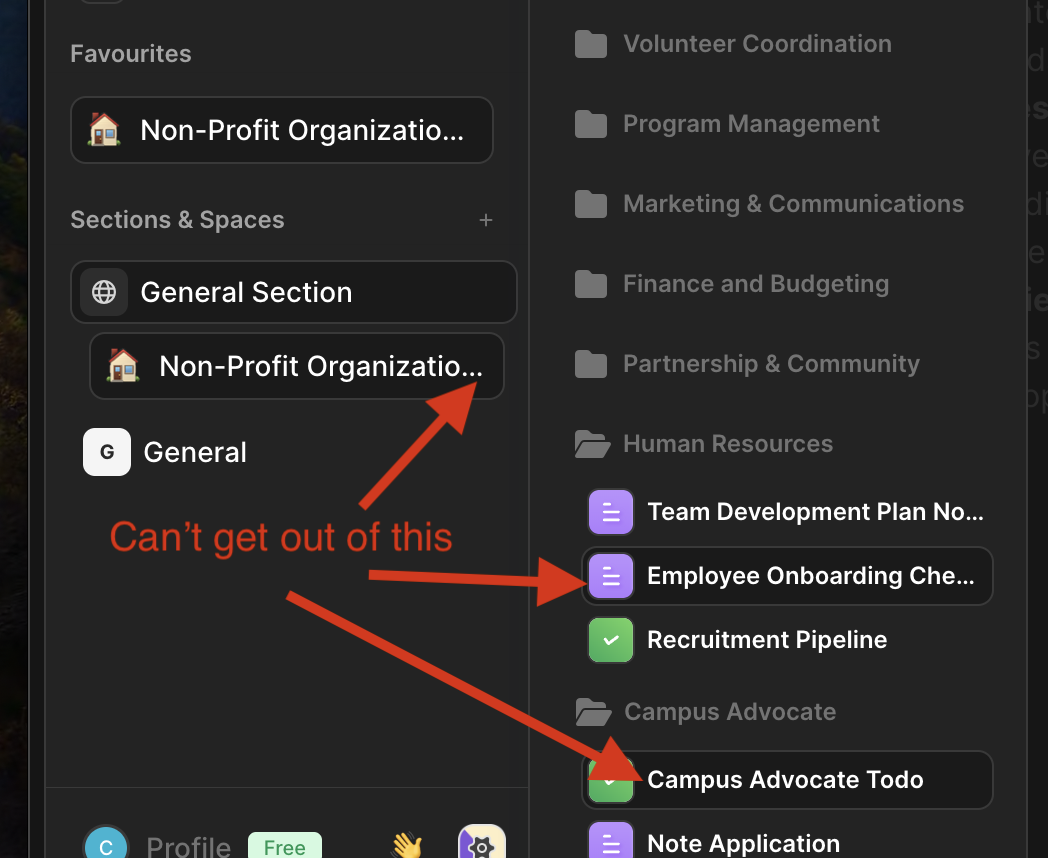
Hello! Using LiftOS on a Mac in Chrome and certain sidebar items don't "save" from rename mode [?] when I click away or hit Enter after renaming. See screenshot attached.
In the image you sent the highlighted ones are the selected Space and 2 apps open in the view. Could it be that this highlight is making you think they are in edit mode @cris ?
Maybe it's not a bug but UX issue
Ege Gündüz
Team•
Jun 15, 2024
the ... at the end of your items is to indicate they are being cut by the container and not edit more indicators
cris
•
Jun 15, 2024
Well, I feel silly because I think you are right. Perhaps make the highlight a lighter color to show that it's an indicator instead? It looks, to me, like it's in "edit name" mode instead of merely "item shown" mode.
Sorry for the confusion. I was mistaken, but perhaps that mistake is some valuable input on how it looks to a new user. :)
Ege Gündüz
Team•
Jun 15, 2024
Yes definitely valuable UX input, thank you 🙌 i'll move this to completed
Ege Gündüz
Team•
Jun 15, 2024
Hey Cris, thanks a lot for sharing - I added this on high priority to our bug board & will be moving this task to done when we fix it or reach out to you for more information 🙌
Log in to comment and vote
Comments5
Ege Gündüz
Jun 15, 2024
In the image you sent the highlighted ones are the selected Space and 2 apps open in the view. Could it be that this highlight is making you think they are in edit mode @cris ?
Maybe it's not a bug but UX issue
Ege Gündüz
Jun 15, 2024
the ... at the end of your items is to indicate they are being cut by the container and not edit more indicators
cris
Jun 15, 2024
Well, I feel silly because I think you are right. Perhaps make the highlight a lighter color to show that it's an indicator instead? It looks, to me, like it's in "edit name" mode instead of merely "item shown" mode.
Sorry for the confusion. I was mistaken, but perhaps that mistake is some valuable input on how it looks to a new user. :)
Ege Gündüz
Jun 15, 2024
Yes definitely valuable UX input, thank you 🙌 i'll move this to completed
Ege Gündüz
Jun 15, 2024
Hey Cris, thanks a lot for sharing - I added this on high priority to our bug board & will be moving this task to done when we fix it or reach out to you for more information 🙌